
WIFI ROAMING ACROSS MULTIPLE ACCESS POINTS
Help users stay connected while moving through WiFi coverage zones
START FREE TRIAL
What is WiFi Roaming?
WiFi roaming allows users to move through an area covered by multiple access points while their device switches from one AP to another. In well-designed multi-AP networks, roaming helps reduce connection interruptions and repeated login prompts as guests move through hotels, venues, campuses, malls, transport areas or public WiFi zones.
Antamedia helps manage the guest WiFi access layer, including authentication, WiFi locations, access rules, Internet plans, session control and reports, while roaming quality also depends on the wireless hardware, signal design and client device behavior.
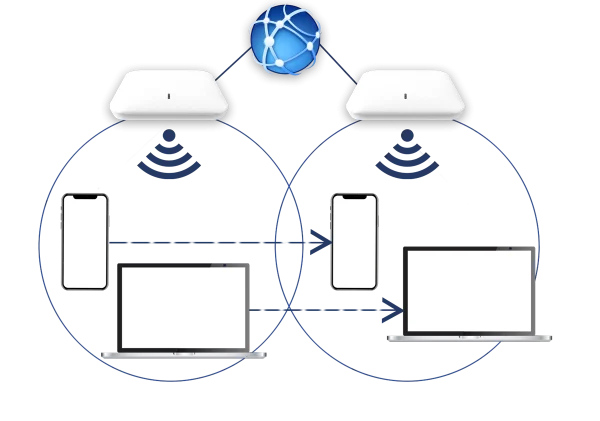
Large WiFi environments often need multiple access points to cover rooms, lobbies, restaurants, halls, shops, terminals, outdoor areas and public zones.
WiFi roaming helps users move between those access points with fewer visible interruptions. Instead of treating each AP as a separate guest experience, the network can provide more consistent access across the covered area.
Roaming performance depends on several factors: access point placement, signal overlap, SSID configuration, channel planning, controller or cloud-managed WiFi features, supported roaming standards and the behavior of the client device.
WiFi Roaming Depends on Network Design
WiFi roaming is a cooperation between the client device and the wireless infrastructure. In most WiFi networks, the phone, tablet or laptop decides when to move from one access point to another.
Good roaming requires proper AP placement, suitable signal overlap, consistent SSID settings, correct security configuration, channel planning and compatible hardware features.
Antamedia manages guest WiFi authentication, access rules, sessions, WiFi locations and reports. The actual roaming decision and roaming speed also depend on the access points, controller or cloud-managed WiFi system and the client device.
Roaming Standards and Network Support
Roaming performance can be improved when the wireless infrastructure and client devices support roaming standards such as 802.11k, 802.11r and 802.11v.
These standards help compatible devices discover nearby access points, reduce authentication delays and make better roaming decisions within the same network.
Actual behavior depends on the AP hardware, controller configuration, SSID settings, security mode, signal design and client device support.
802.11k helps compatible devices discover nearby access points more efficiently by providing information about available roaming candidates.
802.11r can reduce authentication time when compatible devices move between access points on the same network.
802.11v helps the network guide compatible devices toward better access points based on network conditions and configuration.

Roaming Across
WiFi Locations
WiFi roaming becomes easier to manage when access points are organized by location, zone or venue.
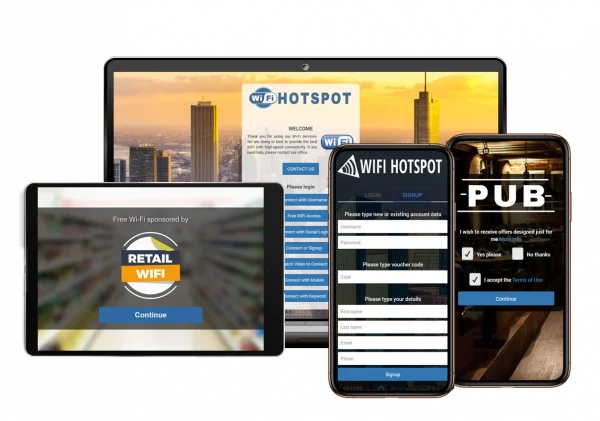
Antamedia WiFi Locations help administrators group APs under shared splash pages, access rules, Internet plans and reports. This allows operators to manage guest WiFi consistently across areas such as hotel lobbies, restaurants, conference halls, mall zones, terminals, campuses and public venues.
Location-based settings also help administrators apply the right branding, access policy and reporting structure for each area.
Cloud Managed WiFi
and HotspotOS
For supported access points, Antamedia cloud-managed WiFi and HotspotOS workflows can help simplify AP management, monitoring and scaling.
Operators can add supported access points, review AP status and manage guest WiFi settings from the dashboard. This is useful when access point control, roaming behavior, location management and guest WiFi access need to work together.
Roaming performance still depends on hardware support, signal design and client device behavior, but centralized AP management helps keep the deployment easier to operate.
Session Continuity and Guest Access
When users move between access points, the WiFi infrastructure handles the wireless roaming process, while Antamedia helps maintain the guest access workflow.
Access rules such as session duration, bandwidth limits, Internet plans, device limits, autologin and reporting can remain connected to the user account or device session, depending on the deployment.
This helps reduce repeated login prompts and keeps guest access easier to manage across multi-AP environments.
WiFi Roaming Use Cases
Hotels can support guests moving between rooms, lobby, restaurant, spa, pool and conference areas.
Shopping malls can provide more consistent guest WiFi across entrances, food courts, retail corridors, lounges and event zones.
Campuses and public venues can support users moving between buildings, halls, outdoor areas and service zones.
Transport hubs can support passengers moving through terminals, gates, lounges, waiting areas and shops.
Restaurants, cafés and resorts can help guests stay connected across indoor and outdoor seating areas.
WiFi Roaming FAQ
WiFi roaming allows users to move through an area covered by multiple access points while their device switches between APs to maintain connectivity.
Roaming can reduce interruptions, but it depends on the wireless hardware, signal design, SSID configuration, client device behavior and supported roaming features.
In most WiFi networks, the client device decides when to move from one access point to another based on signal strength, network conditions and device behavior.
802.11k helps devices discover nearby access points, 802.11r can reduce authentication time during roaming, and 802.11v helps the network guide compatible devices toward better APs.
Yes. With proper configuration, users can move between access points with fewer repeated login prompts during an active guest WiFi session.
Antamedia manages guest WiFi authentication, sessions, access rules, WiFi locations and reports. The actual roaming decision is usually handled by the client device and wireless infrastructure.
WiFi roaming can work with supported access points and HotspotOS workflows, depending on hardware, configuration, signal design and client device support.

