
SELF-SERVICE CUSTOMER PORTAL FOR GUEST WIFI
Let guests manage account details, consent and access status
START FREE TRIALWhat is a Self-Service Customer Portal?
A Self-Service Customer Portal allows WiFi users to review and manage selected account information after login.
Antamedia WiFi Hotspot can provide a customer portal where guests can view access status, usage limits, purchased plans, connected device details, consent preferences, autologin options and personal data controls, depending on the configured deployment.
Self-Service Customer Portal
Customers can access the Self-Service Customer Portal from the Welcome Page or another configured post-login link.
The portal can show account status, purchased plans, available time, remaining quota, speed limits, device information, logout options and selected profile details.
Where consent and data controls are enabled, users can review contact permissions, update inaccurate information or request removal of selected personal data according to the configured privacy workflow.
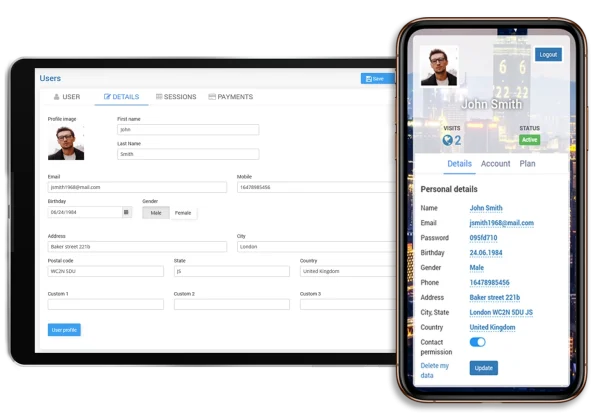
Customer Portal Details
The portal can show the customer profile image where available, account limits, available time, remaining quota, download and upload speed, active device information and a quick logout option.
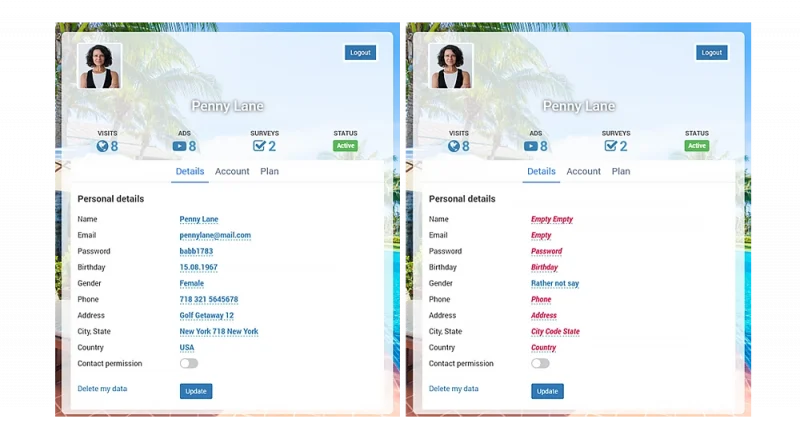
This gives users better visibility into their WiFi access while helping support teams reduce repeated account-status questions.
Connect Customer Portal
with Welcome Page
The Self-Service Customer Portal can be opened from the WiFi Welcome Page after successful login.
This allows guests to connect, view a welcome message and then open their account details, plan status, usage limits, profile options or consent settings from one post-login flow.
White Label
Customer Portal
Partners, ISPs, MSPs and resellers can use white label branding to present the customer portal under their own company name, logo, colors and domain.
This helps service providers offer a branded self-service experience for customers while using Antamedia platform technology in the background.
Self-Service Customer Portal FAQ
A Self-Service Customer Portal allows WiFi users to view and manage selected account information, access status, plan details, usage limits, device information and consent preferences.
Guests can see selected profile details, account status, purchased plans, available time, remaining quota, speed limits, active device information and logout options, depending on the configuration.
Yes. Where enabled, users can review contact permission, remove consent for future communication or request removal of selected personal data.
Yes. The portal can show purchased plans, remaining access time, quota, expiration and plan-related limits for paid WiFi deployments.
Yes. The customer portal can be linked from the WiFi Welcome Page or another configured post-login page.
Yes. Partners and service providers can use white label branding to present selected customer-facing portal workflows under their own company name, logo, colors and domain.
Yes. The customer portal can be used with Antamedia WiFi Hotspot and Enterprise WiFi System, depending on deployment, enabled modules and configuration.
Some of our customers

