
WIFI AUTOLOGIN FOR RETURNING GUESTS
Recognize known devices and simplify repeat WiFi access
START FREE TRIAL

What is WiFi Autologin?
WiFi Autologin helps returning guests reconnect to the WiFi network without completing the full login process every time.
Antamedia WiFi Hotspot can recognize known devices, apply configured access rules and allow repeat access when the device identity, session policy and network settings allow it.
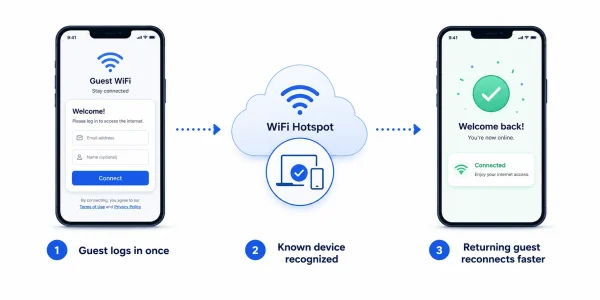
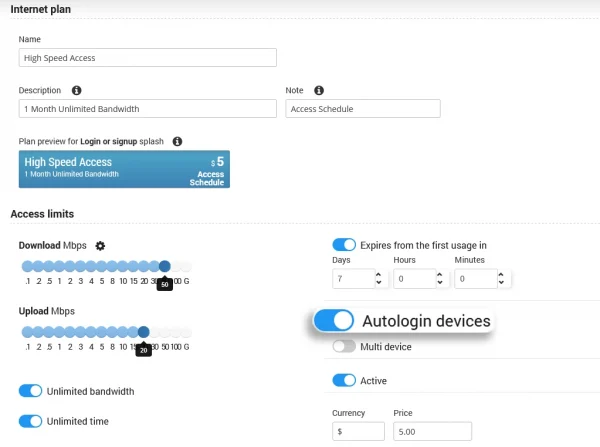
Autologin improves the guest WiFi experience by reducing repeated login steps for users who have already authenticated on the network.
When a returning guest connects again, WiFi Hotspot can check whether the device is already known and whether the previous access rules still allow automatic reconnection. If conditions match, the guest can continue online faster without re-entering login details.
Autologin is useful for hotels, restaurants, cafés, shopping malls, transport locations, public venues and managed WiFi networks where visitors may return during the same day, stay, event or access period.
Autologin and Private WiFi Addresses
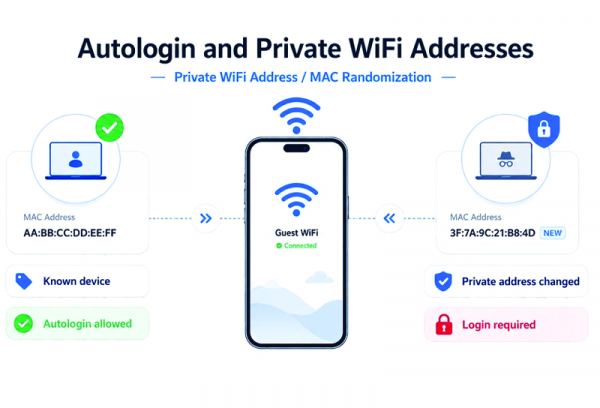
Autologin works best when a device presents a consistent network identifier during repeat visits.
Many modern phones and laptops use Private WiFi Address or MAC randomization features to improve user privacy. If the device changes its WiFi MAC address, the platform may see it as a new device and ask the guest to log in again.
For the best repeat-login experience, venues can inform guests that disabling private/randomized MAC addressing for the venue WiFi network may help the system recognize the device more reliably. When MAC randomization remains enabled, autologin can still work in many cases, but recognition depends on how the device and operating system handle the private address for that network.
WiFi Autologin Features
Guest Notice for Reliable Autologin
For a more reliable autologin experience, guests may be advised to use the same WiFi network profile and keep a consistent private WiFi address setting for the venue network.
If the device changes its private/randomized MAC address, it may be treated as a new device and the guest may need to log in again.
Session and Access Rules
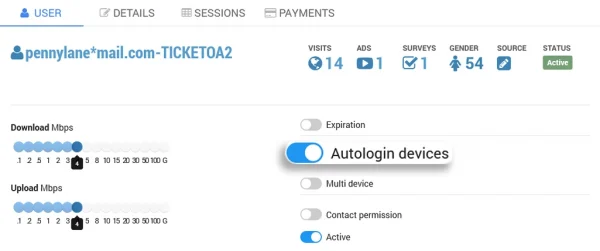
Autologin does not mean unlimited access. Each returning guest is still controlled by the configured WiFi access rules.
Administrators can define how long a device remains authorized, when access expires, how many devices are allowed, which bandwidth or speed limits apply, and whether the user must log in again after a defined period.
This helps businesses balance guest convenience with network control and security.
Autologin Use Cases
Hotels can allow guests to reconnect during their stay without repeated portal login.
Restaurants and cafés can simplify repeat access for returning customers.
Shopping malls can improve the experience for shoppers who move between WiFi zones or return later.
Transport hubs and public venues can reduce login friction during active sessions or event periods.
Managed WiFi providers can use autologin policies to improve repeat access while keeping control over limits and reporting.
WiFi Autologin FAQ
WiFi Autologin allows returning guests to reconnect faster when their device is recognized and the configured access rules still allow repeat access.
No. Autologin still follows the configured access rules, including session duration, expiration time, bandwidth limits, speed limits, device limits and account validity.
A returning guest may need to log in again if the access period expired, the device limit changed, the session rules require re-authentication, or the device uses a new private/randomized MAC address.
Many modern devices use Private WiFi Address or MAC randomization for privacy. If the device changes its WiFi MAC address, the system may see it as a new device and request login again.
Yes. Guests can improve repeat recognition by using the same WiFi network profile and keeping a consistent private WiFi address setting for that venue network.
Yes. Autologin can work with vouchers, accounts, Internet plans and other access methods, as long as the access rules remain valid.
Yes. Autologin can be used with Antamedia WiFi Hotspot and Enterprise WiFi System, depending on deployment, configuration and network behavior.
Some of our customers

