
WIFI ANALYTICS AND REAL-TIME STATISTICS
Track guest WiFi usage, sessions, bandwidth and reports
START FREE TRIAL
What are WiFi Analytics?
WiFi Analytics help operators understand how guests, users and locations use the network.
Antamedia WiFi Hotspot and Enterprise WiFi System can track sessions, bandwidth usage, top users, repeat visitors, login activity, rejected logins, revenue, surveys and campaign performance from one reporting dashboard.
Statistics
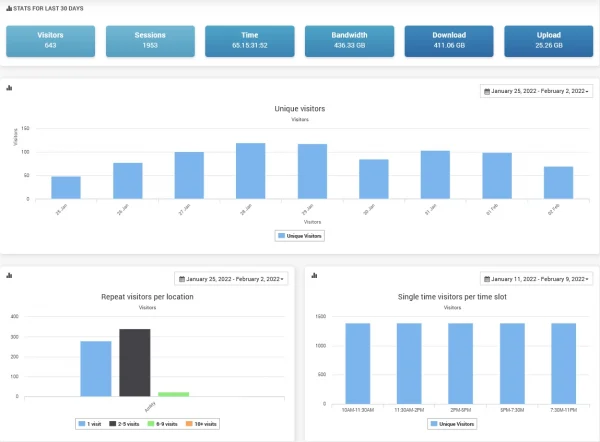
From basic logs to advanced reports, Antamedia gives administrators clear insight into guest WiFi activity and access performance.
You can monitor Internet usage, review active and historical sessions, apply limits through Internet plans and understand how different users, plans and locations consume network resources.
Reports can include bandwidth usage, session statistics, top users, first-time and returning users, rejected logins, location activity, revenue by location and survey results where configured.
Analytics
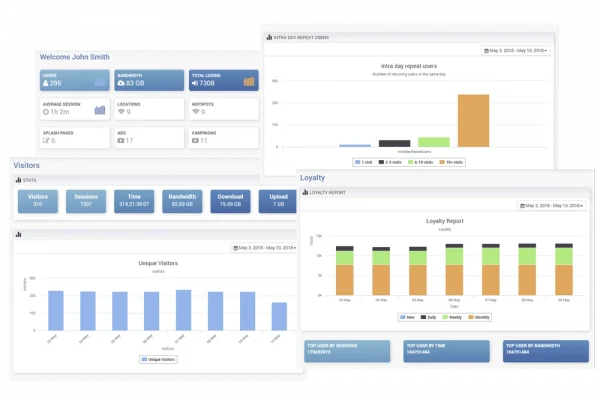
Analytics reports help operators understand how the WiFi service is used across locations, time periods, users and access plans.
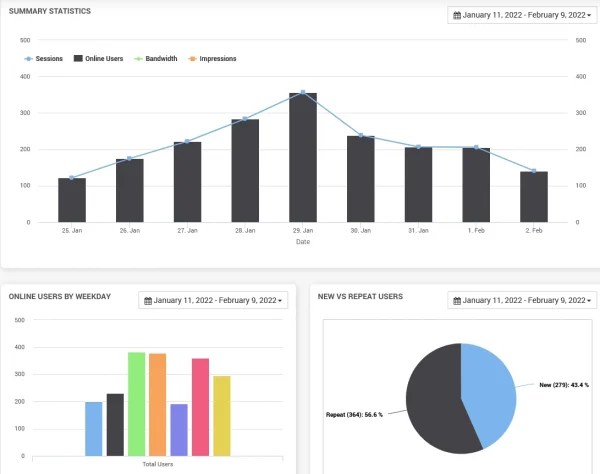
Use date filters to compare activity by day, week, month, location or selected report type. This can help identify high-usage periods, underused locations, bandwidth-heavy users, repeated access issues, plan performance and campaign results.
Survey responses can also be reviewed from the dashboard, helping teams identify positive feedback, complaints and service issues before they become larger operational problems.
WiFi Features
Analytics reports include :
Real-Time Monitoring
Administrators can monitor active users, connected devices, session status and usage activity while the WiFi service is running.
Real-time visibility helps teams detect unusual usage, troubleshoot login issues, review active sessions and respond faster when guests or locations need support.
Location and Multi-Site Reports
For businesses with multiple locations, reports can help compare WiFi activity across hotels, cafés, restaurants, shopping malls, transport zones, branches, venues or reseller locations.
Operators can review top locations, usage trends, revenue activity, campaign delivery and access performance by location or selected date range.
WiFi Analytics FAQ
WiFi Analytics are reports that show how users, devices, locations and access plans use the WiFi network, including sessions, bandwidth, login activity, top users and location performance.
You can track active sessions, login history, bandwidth usage, Internet plan activity, top users, repeat visitors, rejected logins, locations, revenue and survey results where configured.
Yes. Administrators can monitor active users, connected devices, session status and usage activity from the reporting dashboard.
Yes. Location-based reports can help compare usage, sessions, revenue activity, campaign performance and access patterns across multiple WiFi locations.
Yes. Reports can show bandwidth usage, download and upload activity, quota usage and high-usage users or locations.
Yes. Survey and feedback results can be reviewed from the dashboard when surveys are enabled in the WiFi workflow.
Yes. Real-time statistics and reports can be used with Antamedia WiFi Hotspot and Enterprise WiFi System, depending on deployment and enabled modules.
Some of our customers

